Onboarding Journeys
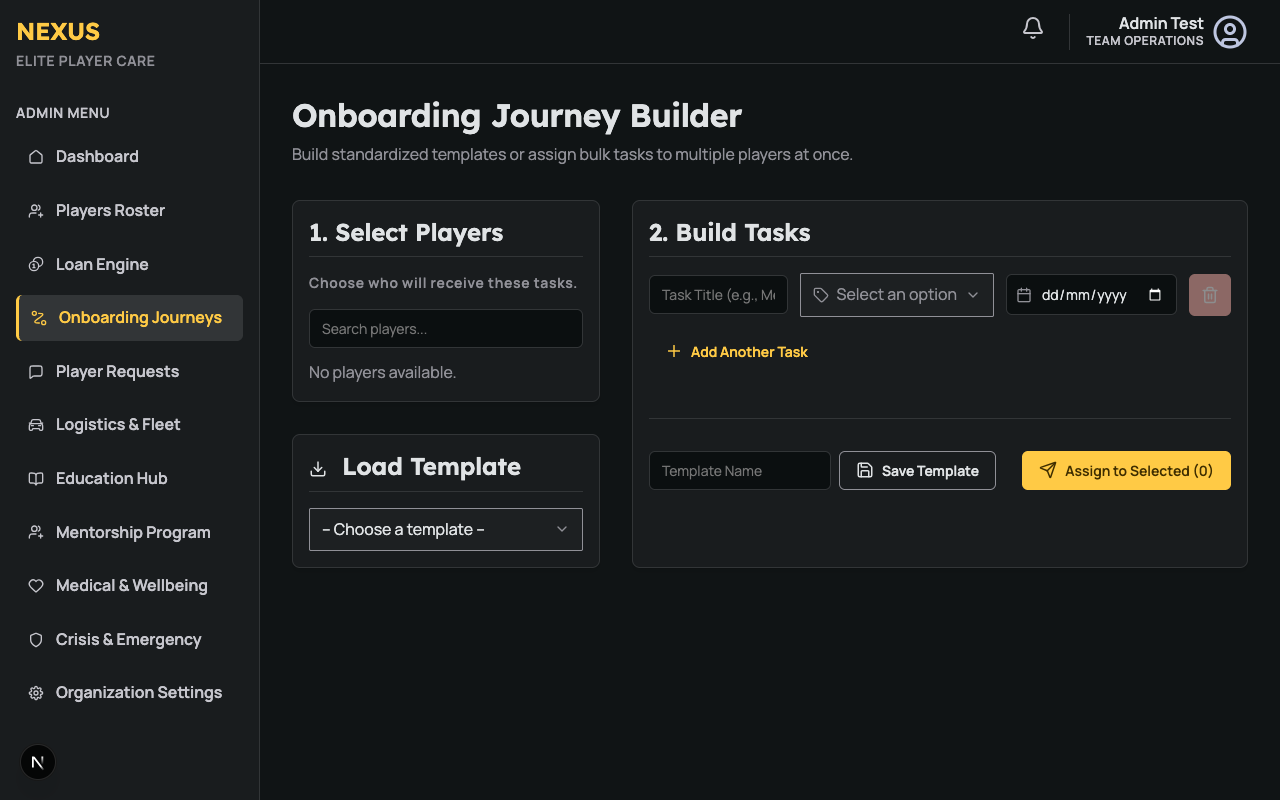
The Onboarding Journey Builder allows Player Care staff to assign structured, milestone-based tasks to players joining the organization or transitioning between teams (e.g., Academy to First Team).
Overview
A successful onboarding process is critical for player integration. The Onboarding Builder standardizes this process by allowing staff to:
- Select one or multiple players to receive a task list.
- Build a customized list of tasks with due dates and categories.
- Save recurring task lists as Templates for future use.
Using Templates
To save time, staff can create reusable templates:
- Load Template: Select a pre-existing template (e.g., "Standard Summer Transfer Onboarding") from the dropdown. This will automatically populate the task list.
- Save Template: After building a custom list of tasks, enter a template name and click Save Template to store it for future use. Note: Due dates are not saved in templates, allowing you to apply them dynamically based on when the template is loaded.
Assigning Tasks
To assign an onboarding journey:
- Select Players: Check the box next to one or multiple players in the left-hand roster list. You can use the search bar to quickly find specific athletes.
- Build Tasks: Add tasks by defining a Title, Category, and Due Date. Use the Add Another Task button to add multiple milestones.
- Submit: Click Assign to Selected.
Once assigned, the players will receive an email notification and the tasks will appear in their Player Portal for them to complete. Staff can track the completion status of these tasks from the Player 360 dashboard.